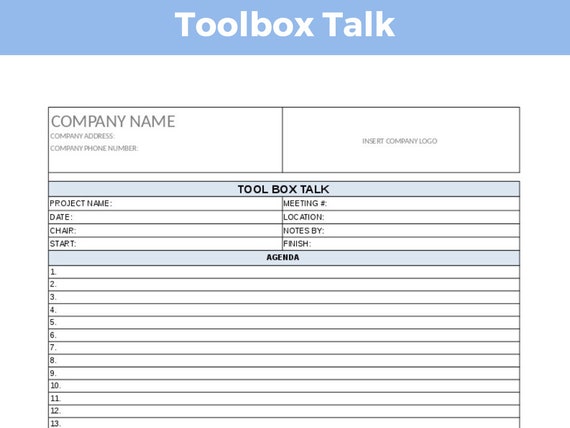
Safety doesn’t start with policy—it starts with conversation. Yet in high-risk environments like construction, manufacturing, and energy, too many safety meetings feel like compliance checklists rather than meaningful dialogue. That’s where an editable toolbox talk template becomes essential: a flexible, reusable framework that turns routine briefings into actionable safety moments.
An effective template isn’t just a form to fill out. It’s a structured yet adaptable tool that guides supervisors through hazard identification, communication, and team engagement—without reinventing the wheel every single day.
Why Most Toolbox Talks Fail (And How the Right Template Fixes It)
Too many sites treat toolbox talks as bureaucratic rituals. A foreman reads from a generic PDF, workers sign in, and everyone disperses—often without retaining a single risk point discussed.
Common failures include:
- One-size-fits-all content: Using a talk about fall protection on a day focused on electrical safety.
- No customization: Failing to address site-specific conditions, like weather, crew changes, or new equipment.
- Poor engagement: No discussion, no questions, no accountability.
- No documentation trail: Missing signatures or lost forms create audit risks.
An editable toolbox talk template solves these issues by offering:
- A standardized format that ensures consistency.
- Customizable fields for location, date, crew, and specific hazards.
- Prompts for discussion and confirmation of understanding.
- Digital or printable formats that support record-keeping.
When a template is truly editable—whether in Word, Google Docs, or a dedicated safety platform—it becomes a living document aligned with daily operations.
Key Components of an Effective Editable Template
A strong editable toolbox talk template isn’t just a blank form. It includes structured sections that guide meaningful conversation while allowing customization. Here’s what should be included:
#### 1. Header Information Essential details that anchor the talk to a specific context: - Date and time - Location or work area - Supervisor name - Crew members present (with signature lines)
#### 2. Topic & Hazard Identification A clearly defined safety topic (e.g., “Working at Heights,” “Lockout/Tagout”) with space to list: - Specific hazards present that day - Potential consequences of exposure - Real-world examples relevant to current tasks
Example: Instead of “Be careful with forklifts,” write: “Today’s task involves transporting steel beams near pedestrian walkways. Blind spots and uneven ground increase collision risk.”
#### 3. Prevention & Control Measures Actionable steps the team will take: - Engineering controls (e.g., guardrails) - Administrative controls (e.g., traffic cones, spotters) - PPE requirements (e.g., high-vis vests, hard hats)

This section should prompt the supervisor to verify that controls are in place before work begins.
#### 4. Discussion Prompts Open-ended questions that spark engagement: - “Has anyone encountered a similar hazard before? What happened?” - “What would you do if you saw a co-worker bypassing a safety step?”
These transform a monologue into dialogue—proven to improve retention and awareness.
#### 5. Sign-Off Section Signatures (or digital equivalents) from all attendees confirm: - Attendance - Understanding of the content - Commitment to follow safety rules
This is critical for compliance and liability protection.
When to Customize Your Template (And What to Change)
A template is only as good as its adaptability. Use these triggers to customize your editable toolbox talk:
| Trigger | Customization Needed |
|---|---|
| New task (e.g., welding) | Update topic, add fire safety controls, PPE specifics |
| Weather change (e.g., heatwave) | Include heat stress symptoms, hydration reminders |
| New crew member | Add orientation notes, buddy system mention |
| Equipment change | Highlight training status, safe operation steps |
| Near-miss incident | Reference the event, discuss preventive actions |
Pro Tip: Save customized versions as dated copies. This builds a library of scenario-specific talks for future use.
Avoid over-editing. Keep the core structure intact—only modify content fields. This maintains consistency and speeds up daily prep.
Top 5 Tools for Managing Editable Toolbox Talk Templates
Not all templates live in Word docs. Modern teams use platforms that streamline creation, delivery, and documentation. Here are five proven options:
| Tool | Format | Key Features | Best For |
|---|---|---|---|
| SafetyCulture (iAuditor) | Mobile app + cloud | Pre-built templates, real-time sign-off, photo evidence, analytics | High-volume sites needing digital records |
| Fluix | PDF + workflow automation | Offline editing, e-signatures, automated routing | Remote or low-connectivity teams |
| EdApp | Microlearning + forms | Voice-enabled input, gamified quizzes | Engaging younger crews |
| ClickUp | Custom forms in task platform | Embed talks in project workflows, assign follow-ups | Teams already using ClickUp for operations |
| Microsoft Word / Google Docs | Editable document | Free, simple, universally accessible | Small crews or budget-limited operations |
Choose based on your team’s tech fluency, documentation needs, and audit frequency. A construction firm with 200+ daily workers benefits from digital tracking. A small maintenance team might thrive with Google Docs and printouts.
Real-World Example:
Using an Editable Template on a Roofing Job
Site: Residential roofing project in Texas Team: 6 workers, including 1 new hire Conditions: 95°F heat, high wind alerts, ongoing shingle tear-off
Customized Template Use:
- Topic: Heat stress and fall protection during roof work
- Hazard Additions:
- Dehydration risk due to high temps
- Loose materials becoming windborne
- New worker unfamiliar with anchor points
- Controls Added:
- Mandatory 10-minute shade breaks every hour
- Double-check harness tethering before ascent
- Buddy system assigned for new hire
- Discussion Prompt:
- “What early signs of heat exhaustion should we watch for in each other?”
- Sign-Off: All 6 signed after verbal confirmation of understanding
The next day, a worker noticed a co-worker slurring speech—acted on training, called for water and rest, prevented heat stroke. The documented talk became evidence of proactive safety culture during an OSHA review.
This is the power of a truly editable, context-aware template.
Common Mistakes to Avoid
with Editable Templates
Even with the right tool, poor execution undermines safety. Watch for these pitfalls:
1. Copy-Paste Without Review Using yesterday’s talk for today’s job—even when tasks differ. Fix: Always review and edit fields before the meeting.
2. Treating It as a Paper Trail Only Focusing on signatures instead of understanding. Fix: Ask questions, encourage stories, confirm comprehension.
3. Overloading the Template Adding 10 topics in one talk. Fix: Stick to 1–2 hazards per session. Depth beats breadth.
4. Ignoring Worker Input Supervisor lectures; crew stays silent. Fix: Use prompts like, “What’s one safety concern you have today?”
5. Losing Records Printed forms thrown away or never filed. Fix: If using paper, store in a labeled binder. Digital? Use cloud folders with date naming.
How to Implement an Editable Template in 4 Steps
Don’t overcomplicate rollout. Follow this workflow:
- Select or Build Your Base Template
- Use a Word doc with the five core components outlined above. Save it as a master.
- Train Supervisors on Customization
- Show them how to edit fields, add hazards, and lead discussions—not just read.
- Pilot for One Week
- Run daily talks using the template. Gather feedback from crew and safety managers.
- Standardize and Scale
- Lock the final version. Distribute to all leads. Audit usage weekly for the first month.
Track completion rates and near-miss reports. If both improve, you’ve got traction.
Final Thought: A Template Is Only as Good as the Talk It Enables
An editable toolbox talk template isn’t a magic fix. It’s a scaffold—an enabler for better communication, sharper awareness, and documented accountability.
The best templates are simple enough to use daily, flexible enough to reflect real conditions, and structured enough to ensure nothing critical is missed.
Start with a proven format. Customize it to your site. Use it consistently. And always remember: the goal isn’t just to check a box. It’s to start a conversation that keeps every worker going home safe.
Download a free editable toolbox talk template (Word/PDF) [insert internal link], or integrate with your existing safety app using our compatible formats.
Frequently Asked Questions
What should be included in a toolbox talk template? A complete template includes topic, date, location, attendees, hazard description, control measures, discussion questions, and sign-off section.
Can I use a digital editable template on-site? Yes—tools like SafetyCulture or Fluix allow offline editing and e-signatures, making digital use practical even in remote areas.
How often should toolbox talks be held? Daily or per shift change is ideal, especially when tasks, crews, or conditions change.
Are toolbox talk templates OSHA compliant? OSHA doesn’t mandate templates, but requires documented safety training and hazard communication. A signed, editable template satisfies these requirements.
Can workers edit the template? Workers shouldn’t modify the master template, but should contribute content during the talk—especially hazard insights and suggestions.
Should toolbox talks be recorded? Written records (digital or paper) with signatures are essential. Audio or video isn’t required but can support training reviews.
How long should a toolbox talk last? Aim for 5–10 minutes. Focus on one or two key hazards to maintain engagement and clarity.
FAQ
What should you look for in Editable Toolbox Talk Template for Real-World Safety? Focus on relevance, practical value, and how well the solution matches real user intent.
Is Editable Toolbox Talk Template for Real-World Safety suitable for beginners? That depends on the workflow, but a clear step-by-step approach usually makes it easier to start.
How do you compare options around Editable Toolbox Talk Template for Real-World Safety? Compare features, trust signals, limitations, pricing, and ease of implementation.
What mistakes should you avoid? Avoid generic choices, weak validation, and decisions based only on marketing claims.
What is the next best step? Shortlist the most relevant options, validate them quickly, and refine from real-world results.