Every year, preventable machinery accidents occur because of poor lockout tagout (LOTO) practices. One of the most critical safeguards—routine LOTO inspections—is only effective if documented properly. That’s where a lockout tagout inspection form PDF becomes essential. It’s not just paperwork; it’s proof that your team is protecting workers from hazardous energy releases during maintenance and servicing.
A well-designed LOTO inspection form PDF standardizes audits, ensures consistency, and provides a legal record during OSHA reviews. More importantly, it turns abstract safety policies into actionable, repeatable checks.
Below, we break down everything you need to know about using, customizing, and implementing these forms—plus sources for free, downloadable templates.
Why a Lockout Tagout Inspection Form PDF Matters
OSHA standard 29 CFR 1910.147 requires that each energy control procedure be inspected at least annually. This isn’t optional. The inspection must be performed by an authorized employee who is not the one using the procedure being reviewed.
The form used for this inspection serves multiple roles:
- Proof of compliance during audits
- Identification of procedural gaps (e.g., missing energy sources, incorrect sequence)
- Training reinforcement through real-world observation
- Accountability tracking with signatures and dates
A PDF format offers several advantages: - Easily distributable across departments - Compatible with tablets and mobile devices in the field - Preserves formatting when printed or emailed - Can be secured, annotated, or password-protected
Without a structured form—especially one saved as a reusable PDF—these inspections become inconsistent, incomplete, or lost entirely.
Key Elements of an Effective LOTO Inspection Form
A high-impact lockout tagout inspection form PDF isn’t just a checklist. It’s a detailed audit tool designed to catch real-world risks. Here are the non-negotiable sections it should include:
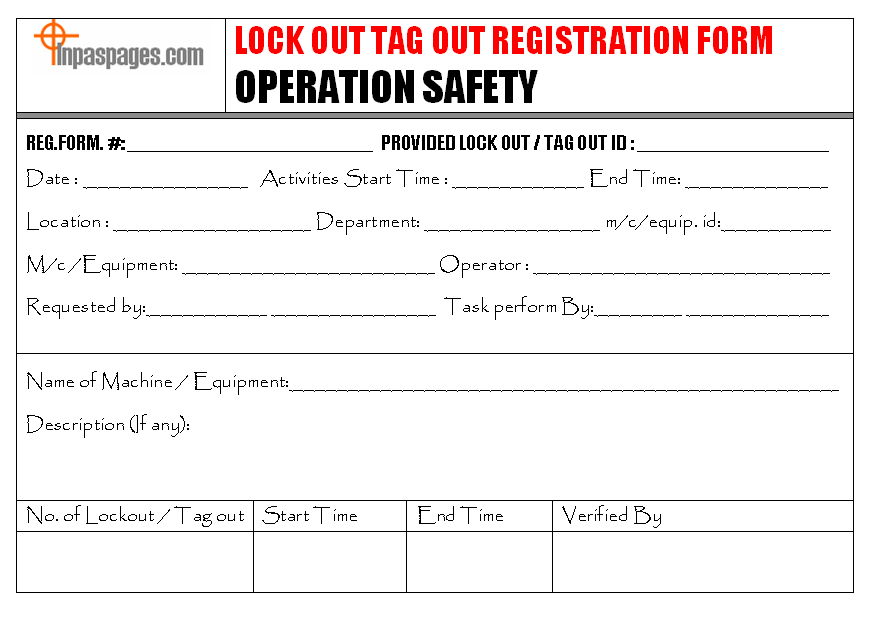
#### 1. Basic Inspection Information - Inspection date - Equipment name and ID - Location (department, floor, zone) - Inspector name and title - Employee being observed (if applicable)
#### 2. Procedure Verification This section confirms whether the written LOTO procedure matches the actual work being done. Common gaps include: - Missing energy source identification (electrical, pneumatic, hydraulic, thermal, etc.) - Incorrect lock application order - Tags not filled out completely (name, date, reason)
#### 3. Employee Knowledge Assessment The inspector should ask the employee questions like: - “How do you verify zero energy state?” - “What would you do if a co-worker tried to restart this machine?” This ensures understanding, not just compliance.
#### 4. Lock and Tag Condition Check Are locks still functional? Are tags faded, torn, or missing info? This section documents: - Number of locks used - Condition of hasps, lockout devices, and group lockboxes - Whether locks are personal and non-defeatable
#### 5. Corrective Actions & Sign-Off Any deficiencies must be recorded with: - Description of the issue - Recommended fix - Responsible party and deadline - Final sign-off by supervisor or safety officer
A blank space doesn’t cut it. Use a structured table to ensure nothing slips through.
Common Mistakes That Invalidate LOTO Inspections

Even with a PDF form in hand, many organizations fail OSHA audits due to recurring errors. Avoid these pitfalls:
1. Using the same employee to inspect their own procedure OSHA explicitly prohibits this. The inspector must be independent and trained, but not the person who uses the procedure daily.
2. Checking boxes without verification A rushed inspector who doesn’t watch a full lockout cycle misses critical flaws. Example: A machine may appear de-energized, but residual pressure in a hydraulic line could still pose a danger.
3. Failing to update forms after equipment changes If a motor is replaced or a new energy source added, the LOTO procedure—and the inspection form—must reflect it. Outdated forms create false confidence.
4. Storing PDFs on a single local drive If the file can’t be retrieved during an OSHA visit, it doesn’t exist. Store completed inspection forms in a centralized, backed-up system with access controls.
5. Not acting on findings An inspection that identifies missing locks but no follow-up is worse than no inspection. It shows awareness of risk without corrective action.
How to Use a Lockout Tagout Inspection Form PDF in Practice
Let’s walk through a real-world example:
Scenario: A packaging line at a food processing plant requires monthly maintenance. During a scheduled LOTO inspection, the safety officer uses a standardized PDF form.
Step 1: Open the PDF on a tablet (or print it). Fill in equipment ID: “Line 3 – Filler Capper Unit.”
Step 2: Observe the maintenance technician perform a full lockout: - Isolation of main electrical disconnect - Depressurization of compressed air lines - Application of one personal lock and one departmental lock
Step 3: Cross-check each action against the written LOTO procedure. The form flags that the technician didn’t bleed residual pressure from the air lines—a critical omission.
Step 4: Note the deficiency in the corrective action section. Assign follow-up training for the technician within 48 hours.
Step 5: Save the completed form as “LOTO_Inspection_FillerCapper_2025-04-05.pdf” and upload to the company’s safety documentation portal.
This process turns a routine task into a living safety protocol.
Where to Download Free Lockout Tagout Inspection Form PDFs
Not every company has the resources to build custom forms from scratch. Fortunately, several reputable sources offer free, ready-to-use templates:
| Source | Features | Customizable? | Notes |
|---|---|---|---|
| OSHA.gov | Basic compliance-aligned form | Yes (fillable PDF) | Government-backed, minimal design |
| SafetySmart Resources | Multi-page, includes employee quiz | Yes | Ideal for training integration |
| Creative Safety Supply | Visual layout with icons | Yes | Clean, print-friendly design |
| J. J. Keller | Professional template with OSHA references | Yes | Requires email sign-up |
| SafetyForms.com | Editable fields, multi-language ready | Yes | Subscription model after first download |
Pro tip: Always review downloaded templates against your internal procedures. Add equipment-specific prompts (e.g., “Verify steam valve isolation” for boilers) to increase relevance.
Customizing Your LOTO Inspection Form PDF
A generic form might cover the basics, but tailored forms catch more risks. Here’s how to adapt a standard PDF:

1. Use Adobe Acrobat Pro or free tools like PDFescape These allow you to: - Add custom fields (e.g., “Serial # of lock used”) - Insert company logo and safety policy statement - Make fields required to prevent omissions
2. Add equipment-specific sections For high-risk machinery, include: - “Confirmed capacitor discharge?” - “Verified gravity hazards blocked?” - “Checked remote start points disabled?”
3. Build in conditional logic (for digital use) If “Hydraulic system present?” = Yes, then show additional hydraulic safety checks. This reduces clutter and improves accuracy.
4. Include photo attachment capability Modern PDFs can support embedded images. Allow inspectors to attach photos of damaged locks or improper tagging.
5. Version control Rename updated forms with version numbers (e.g., “LOTO_Inspection_v2.1.pdf”) and archive old versions.
Integrating LOTO Inspections into Your Safety Workflow
A PDF form shouldn’t be an isolated artifact. It should feed into a broader safety system.
Monthly Calendar Alerts Assign responsibility. Set recurring reminders 30 days before each annual inspection due date.
Digital Workflow (Recommended) Instead of printing and filing: - Distribute via email or safety apps (e.g., SafetyCulture, Fulcrum) - Use cloud storage (SharePoint, Google Drive) with folder per equipment type - Automate notifications when corrective actions are overdue
Audit Preparation Three months before your OSHA review, pull all LOTO inspection PDFs. Check for: - Consistent signatures - Evidence of corrective actions - No blank or missing forms
Gaps here are red flags.
Employee Access Make the latest version of the form accessible to all authorized employees. If they can’t find it, they won’t use it correctly.
The Bottom Line: Your LOTO Inspection Form PDF Is a Liability Shield
A well-executed lockout tagout inspection form PDF does more than check regulatory boxes. It creates a culture of verification. It turns safety from a policy into a practice.
Download a template today, customize it for your equipment, and commit to annual (or more frequent) reviews. Store each completed PDF securely and act on every finding—no exceptions.
Because when an OSHA inspector walks in, or worse, when an accident occurs, the question won’t be “Do you have a LOTO program?” It will be “Where’s the proof?”
Your completed inspection forms are that proof.
FAQ
Where can I find a free lockout tagout inspection form PDF? OSHA’s website, Creative Safety Supply, and SafetySmart offer free, downloadable, and customizable PDF templates.
How often must LOTO inspections be conducted? At least annually, as required by OSHA 29 CFR 1910.147(c)(6). More frequent checks are recommended for high-use or high-risk equipment.
Who can perform a LOTO inspection? An authorized employee who does not normally perform the energy control procedure being inspected.
Can I use a digital form instead of paper? Yes. Digital or PDF forms are acceptable as long as they are completed, signed, and stored securely.
What happens if I fail a LOTO inspection? Deficiencies must be corrected immediately. Unresolved issues can lead to OSHA citations, fines, or increased risk of injury.
Should the inspection form match the written LOTO procedure? Yes. The form should verify that the written procedure is accurate and being followed correctly.
Can one form cover multiple machines? No. Each piece of equipment requires its own inspection, as energy control procedures are machine-specific.
FAQ
What should you look for in Lockout Tagout Inspection Form PDF Guide & Free Templates? Focus on relevance, practical value, and how well the solution matches real user intent.
Is Lockout Tagout Inspection Form PDF Guide & Free Templates suitable for beginners? That depends on the workflow, but a clear step-by-step approach usually makes it easier to start.
How do you compare options around Lockout Tagout Inspection Form PDF Guide & Free Templates? Compare features, trust signals, limitations, pricing, and ease of implementation.
What mistakes should you avoid? Avoid generic choices, weak validation, and decisions based only on marketing claims.
What is the next best step? Shortlist the most relevant options, validate them quickly, and refine from real-world results.